
Mapbox and Webflow CMS Multi-Location Interactive Map
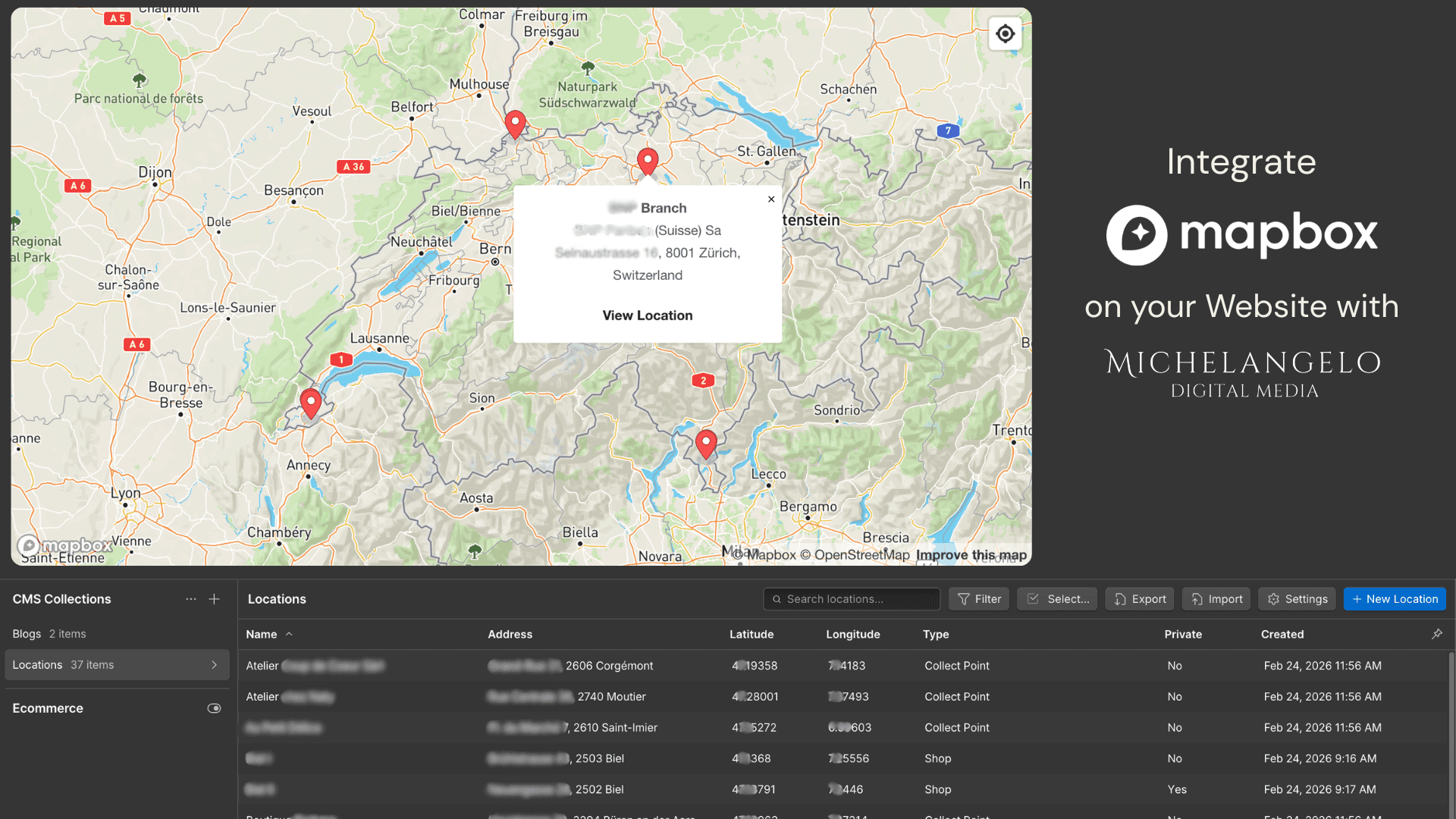
If your business has multiple locations, like branches, pickup points, ATMs, showrooms, service hubs, your website needs more than a static Google Maps embed or a list of addresses. You might want an interactive, user friendly map that your team can update without touching any code.
In this article we show how we built exactly that connecting Webflow CMS and Mapbox: a fully dynamic multi-location map where every location detail can be managed directly from the Webflow editor.
The Problem with Standard Map Solutions
Most businesses with multiple locations end up with a static Google Maps embed, which is impossible to customize and without possibility of adding a new location.
The alternative is a hardcoded list of coordinates buried somewhere in the site's custom code: functional, but a maintenance nightmare the moment you want to add a new one or modify the opnening times.
Neither scales or puts the client in control in case of changes.
Our Solution: Webflow CMS + Mapbox
Mapbox is a professional mapping platform used by companies like Greenpeace, BNP Paribas, and The New York Times. Unlike Google Maps, Mapbox gives you complete visual control over the map style, marker design, popup behavior, and interaction logic.
Connected to Webflow CMS, it becomes a map that you can manage entirely from the Webflow editor once it is set up. Without code or developer dependency.
Here is how it works.
How the CMS Structure Works
Each location is a CMS Collection item in Webflow. For every location you create fields for the essential data the map needs to function:
Name: the location's display name
Latitude and Longitude: the coordinates (easy to get from Google Maps)
Category: the type of location, which controls the marker color
Opening times: displayed inside the popup
Public or Private: a toggle that adds a visible badge in the popup
Optional fields: address, phone number, a link to Google Maps directions
Once the CMS collection is set up, the map reads these fields automatically. When adding a new location in the CMS, after publish, the pin appears on the map immediately.
The Result: What Users See
On the published site, users see a clean, minimal map with colored dot markers, each color representing a different location category. Clicking any marker opens a popup with the location name, category, and the other custom fields based on your business.
The popup can also include a phone number to call directly or a link to get directions, for service-based businesses where the user needs to take action immediately after finding the right location.
The map style itself is customizable via Mapbox. We use the Mapbox Light style for clean, modern look that fits Swiss and German design standards, but you can match any brand aesthetic.
Who This Is Built For
This solution makes the most sense for businesses with a multiple physical locations, who want to manage location data without developer, and would like to showcase key operational information like opening hours or service availability interactively.
Concrete examples include banks or financial institutions with branches, ATMs, or retail chains with flagship stores, outlets, and partner locations. Healthcare networks with clinics, labs, and pharmacies. Logistics companies with depots, collection points, and service hubs.
In these cases, the map is a functional tool that helps users find the right location for their specific need.
Why Mapbox Over Google Maps
Google Maps is the default choice for most web projects, but it has meaningful limitations for this use case.
Mapbox gives you complete control over marker design, popup styling, and map appearance. You can match your brand colors exactly, use custom dot markers or icons, and control every visual detail of the popups. Mapbox also has a generous free tier: up to 50,000 map loads per month at no cost, which covers virtually any small to medium business use case comfortably.
Is This Right for Your Project?
If you are evaluating whether this solution fits a specific project, the question to ask is simple: do you want to manage location data independently, and have an interactive, user friendly map on your website?
If yes, Webflow CMS + Mapbox is the cleanest and most maintainable solution available without building a custom backend.
If the client has a single location or purely static data, a simple Google Maps embed is sufficient and this level of complexity is unnecessary.
Work With Us
We build Webflow websites with real functionality: CMS-driven maps, integrations, automations, and custom interactions. If you have a project in mind we would be glad to talk through the right approach.
Michelangelo Digital Media is a Webflow and Framer agency working with startups, SMEs, and established companies across Switzerland, Germany, and internationally.